How to Configure robots.txt and llms.txt for AI Crawler Access
Jitender • 9/16/2026
AI crawlers are automated bots used by AI companies and search platforms to access website content for purposes such as search, retrieval, indexing, or other AI-related systems. For website owners, understanding how these crawlers interact with your site is an important part of technical AI search optimization.
Two files commonly discussed in this context are robots.txt and llms.txt, but they serve different purposes. robots.txt provides crawler access instructions, while llms.txt is an emerging convention designed to provide LLM-oriented guidance about a site's most important content. Neither file guarantees AI citations or mentions, but correctly configuring crawler access and maintaining clear content signals can remove technical obstacles that may limit how your website is discovered or understood.
Robots.txt vs llms.txt: What's the Difference?
robots.txt is an established web standard, supported by search engines and AI crawlers alike for years. llms.txt is a newer, emerging convention, still being adopted unevenly across AI systems, and it does not replace robots.txt in any way. One controls whether a crawler can access your content at all. The other simply offers a curated map of what matters most, for crawlers that choose to read it.
How robots.txt Controls AI Crawler Access
robots.txt is a text file placed at the root of a website that provides instructions to automated crawlers about which areas of the site they may or may not access.
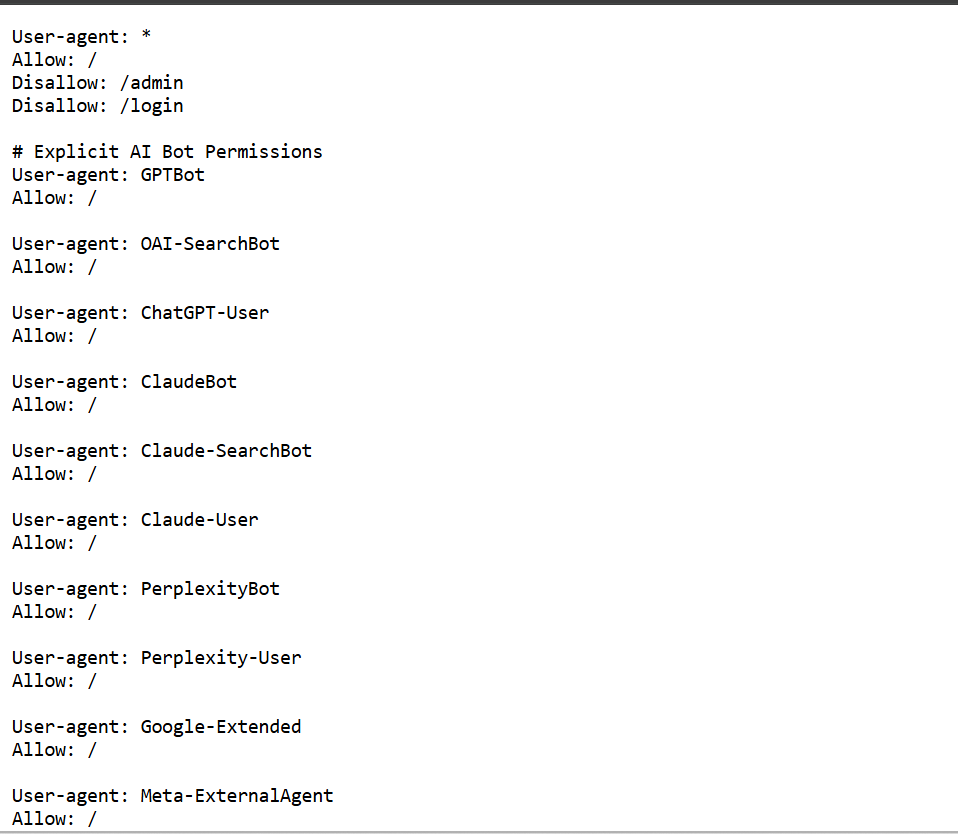
For AI-related crawling, these instructions can apply to provider-specific bots such as GPTBot or other crawlers identified in a provider's documentation. However, robots.txt is not a guarantee that a crawler will visit, index, retrieve, cite, or recommend a page. It primarily communicates access preferences and restrictions.
Specific AI crawlers can be addressed individually by name, rather than lumped in with general bots. Blocking a crawler entirely is different from allowing it selectively, and most sites benefit from being deliberate about which approach applies to which sections of the site.
AI Crawlers You May Want to Review
A few crawlers worth checking specifically include GPTBot, OAI-SearchBot, Google-Extended, ClaudeBot, PerplexityBot, and Amazonbot.Understanding how these bots access and process website content is also important when evaluating your overall AI crawler strategy. Each serves a different purpose, some for training, some for live retrieval, some for shopping-related indexing. Not every crawler needs the same access, and decisions here should follow your site's actual objectives rather than a blanket allow or block rule applied to everything at once.
How to Configure robots.txt for AI Crawlers
Allow a crawler fully:
User-agent: GPTBot
Allow: /
This configuration communicates that the specified crawler is allowed to access URLs on the site. It does not guarantee that the crawler will actually visit every URL or that the content will subsequently appear in AI-generated answers.
Block a crawler entirely:
User-agent: GPTBot
Disallow: /
Allow specific sections while restricting others:
The first rule opens the entire site to that crawler. The second blocks it completely. In the similar way you can also block a specific crawler.
How to Create an llms.txt File
An llms.txt file sits at your site's root, written in plain markdown, offering a short description of the site along with links to the pages worth prioritizing. A useful structure includes a brief site description, core pages, and key resources or documentation.
Robots.txt and llms.txt: How They Work Together
robots.txt controls crawler access. llms.txt provides a curated content map for crawlers willing to use it. Website content provides the actual information behind both files. External authority and entity signals add further context beyond your own site. These layers work together, but llms.txt cannot override robots.txt. A page blocked in robots.txt stays blocked, no matter what llms.txt claims about it.
Common robots.txt Mistakes That Can Block AI Crawlers
Accidentally leaving a bare Disallow: / in place, which blocks an entire site. Blocking important directories without realizing it. Using User-agent: * in a way that unintentionally blocks every bot, AI crawlers included. Misspelling or misnaming a crawler's user-agent string, which means the rule never actually applies. Forgetting the sitemap declaration entirely. Writing conflicting rules that contradict each other for the same crawler. Blocking CSS or JS files unnecessarily, which can affect how a page is rendered and understood. Assuming robots.txt governs every AI system, when some tools do not respect it consistently.
Common llms.txt Mistakes
Treating llms.txt as a substitute for robots.txt rather than a separate, complementary file. Listing inaccurate or outdated URLs. Including every page on the site instead of the ones that actually matter. Writing promotional descriptions instead of clear, useful summaries. Linking to pages that are blocked or non-canonical, which defeats the purpose of the file. Letting the file go stale after a site restructure. Assuming AI systems are obligated to follow it, when adoption is still inconsistent across providers.
AI Crawler Access Audit Checklist
- robots.txt exists at the site root
- robots.txt returns an HTTP 200 response
- Important pages are not unintentionally blocked
- AI crawler directives have been reviewed by name
- Sitemap declaration is included
- Canonical URLs are accessible, not blocked
- llms.txt is available, if you have chosen to implement it
- llms.txt contains genuinely important pages
- URLs across both files are valid and current
- No conflicting access rules exist across directives
- AI visibility is monitored after any changes are made
How to Test robots.txt and llms.txt
Check the file directly at yourdomain.com/robots.txt and yourdomain.com/llms.txt. Test how specific crawler rules behave using a robots.txt testing tool. Crawl your own important pages to confirm they load as expected. Validate that every URL listed actually resolves and is canonical. Monitor AI visibility afterward, since a correct configuration should be verified against real results rather than assumed to be working.
Does Allowing AI Crawlers Improve AI Search Visibility?
Allowing a crawler does not guarantee a citation. robots.txt controls access, not rankings or recommendations. llms.txt does not guarantee inclusion in an AI-generated answer either. What both files do is remove a barrier that would otherwise block visibility outright. From there, actual visibility depends on a combination of factors, including content quality, entity clarity, authority, accessibility, and relevance to the questions being asked. Getting crawler access right is a prerequisite, not a strategy on its own, which is why it pairs naturally with ongoing AI visibility tracking rather than being treated as a fix in isolation.
Conclusion
robots.txt handles access instructions. llms.txt offers content guidance and curation. Your actual website content carries the information both files point toward. AI visibility itself is the outcome, shaped by all of these signals together along with entity clarity and broader authority. Getting the technical configuration right removes a barrier that would otherwise block visibility before it has a chance to happen, but it is a starting point, not the finish line.

FAQs